Replacing the RTC lithium battery
The product is not designed to operate without a lithium battery. If the lithium battery is flat or disconnected, the BIOS settings will be reset to their factory defaults.
DANGER

Your product contains a lithium battery.
Lithium batteries may explode or catch fire if handled incorrectly.
- When replacing, use only the same type.
- Dispose of used batteries in accordance with the instructions.
| Do not dispose of lithium batteries in ordinary household waste. Dispose of the lithium battery in accordance with local regulations governing the disposal of this type of hazardous waste (e.g. at battery recycling points). |

Pins | State | 2-pin BAT plug |
|---|---|---|
1 | VBAT + |
|
2 | GND (-) |

PIN | State | 3V BR2032 |
|---|---|---|
Red | + |
|
Black | - |
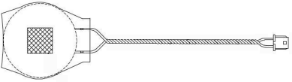
To replace the lithium battery at the end of its service life, proceed as follows:
- Make sure the product is switched off and disconnected from the mains by unplugging the power lead.
- Place the product on a soft ESD mat with the heat sink facing downwards.
- Remove the two screws securing the cover plate to the underside of the main housing. Keep the screws for future use.
- Lift the cover plate slightly and slide it out of the retaining clip.
- Unplug the lithium battery from the connector.
- Pull gently to detach the adhesive pad on the lithium battery from the internal connector housing.
- Insert the plug of the new lithium battery into the connector. Make sure the polarity is correct.
- Secure the new lithium battery to the internal connector housing using a new adhesive pad.
- Close the product by refitting the cover plate on the underside and securing it with the two screws from step 2.