Preparing a USB stick
"⋙ Rufus" or "balenaEdger" are free, open-source tools for Windows that allow you to easily create bootable USB sticks and memory cards.
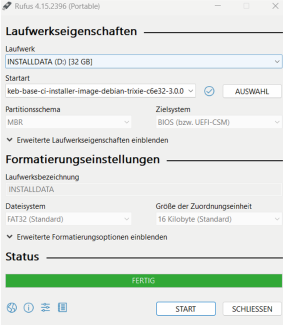
In the following example, the USB stick is made bootable using the Rufus programme:
- Under ‘
’ (Drive), select the USB stick. - If you are using the start option, go to ‘
’ Select ‘’ to choose the desired boot image. - Set all other options as shown.
- Start the image creation process by typing ‘
Start’.